

It might be time to declutter your computer if you’ve ever spent a morning trying to track down a lost file on your hard drive. Or maybe you waster 2 hours searching through a decade of email for one single item?
I know, that you know that, digital disorder and clutter can also take a toll on your wellbeing. Most people handle a constant flow of text messages, emails, photos, videos, and other digital information and never take the time or energy to declutter all of this information. When digital data piles up, it can slow you and your devices down. Keep reading for a step-by-step guide to declutter, downsize and organize your digital clutter.
Get Organized
Does your documents folder or email inbox resemble a junk drawer with everything tossed in together? Do you usually rely on your search box to help you find files? An organization structure can help you declutter, share, synchronize, move, and easily track down files. Follow these simple steps to get your digital life organized:
Designate Categories
Browse through your files and emails and determine the major and minor categories they fall into. For instance, you may be able to divide photos into “work photos,” “family photos, “head shots,” etc. Within those categories, you may have subcategories.
Make Folders
Once you’ve determined what categories and subcategories you want to use for each type of file, make folders or subfolders for them.
Develop Naming Guidelines
Librarians who manage large digital collections use consistent, meaningful, and descriptive names to identify what’s inside each file. Follow suit, and you’ll be amazed at how much easier it is to track down specific files and photos when you need them.
If you find unnamed documents, designate a naming structure such as “descriptive keywords-type of document.” For example, this article might be named “digital-decluttering-article.”
For images, create a structure such as “descriptive keywords-month-year.” For example, vacation photos might be named “Hawaii-vacation-March-2017). For emails, use descriptive subject headings.
Automate Email Organization
Email inboxes can become unmanageable quickly. Depending on your email provider, you can automatically filter incoming emails into certain folders. For instance, all newsletters can be sent to a “newsletters” folder, and emails from colleagues can automatically be sent to a “work” folder.
Declutter Your Digital Past
Depending on how long it’s been since you’ve sorted through your digital data, you may need to do a major purge to get back on track. As with any big organizational project, the hardest part can be getting started. Set aside plenty of time, and commit to going through everything saved on your computer, mobile devices, external hard drive, or in the cloud, including photos, files, and personal records.
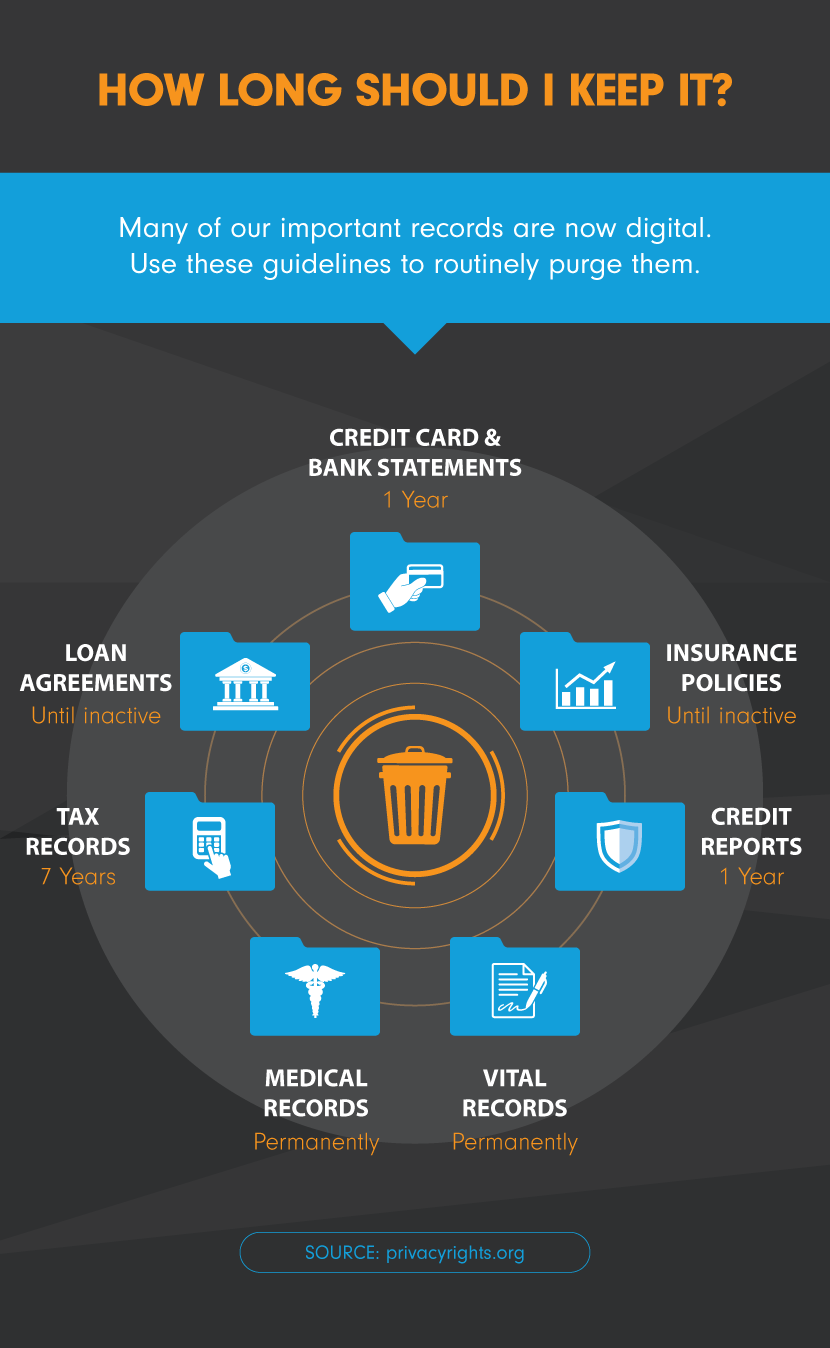
I know that decluttering can be an emotional process. Set a relaxing tone by listening to music and treating yourself to your favorite beverage. Repeat the decluttering motto: “If in doubt, throw it out,” and begin sorting files into folders. If you find yourself deliberating for more than a minute about keeping any item, create a “maybe” folder, and put it there.
Most of us accumulate a lot of photos and videos, because it’s so inexpensive and easy to snap and upload them these days. Photos and videos can hold a lot of sentimental value and can be difficult to downsize. However, it’s worth it! Not only are these files large and expensive to store; you don’t want to have to scroll through hundreds of files to find the photos that are meaningful to you.
Start by purging the following:
Blurry photos
Duplicates
Extremely similar photos
Photos with poor lighting
Poor quality videos
Photos or videos that no longer hold sentimental value
Photos or videos that are no longer meaningful to you
Back up Important Files
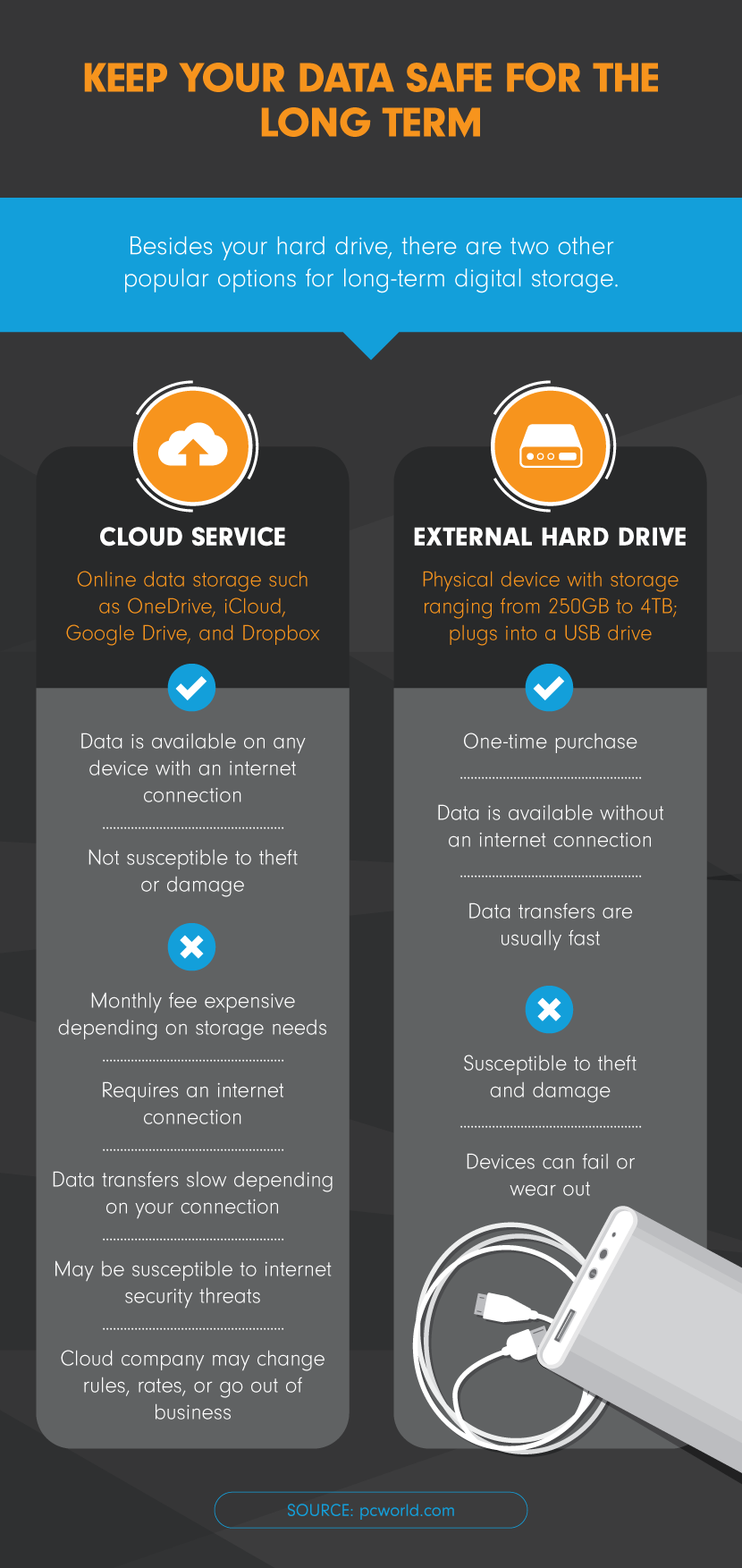
Once you’ve purged and organized, you’ll be left with only those files that are important and meaningful to you. Ensure that they’re safe! Computer hard drives don’t last forever and are susceptible to mechanical defects, virus and malware attacks, accidents, and other threats.
Most experts recommend saving important data in three locations. For instance, you could save one copy on your computer’s hard drive, one in a cloud service, and one on an external hard drive.
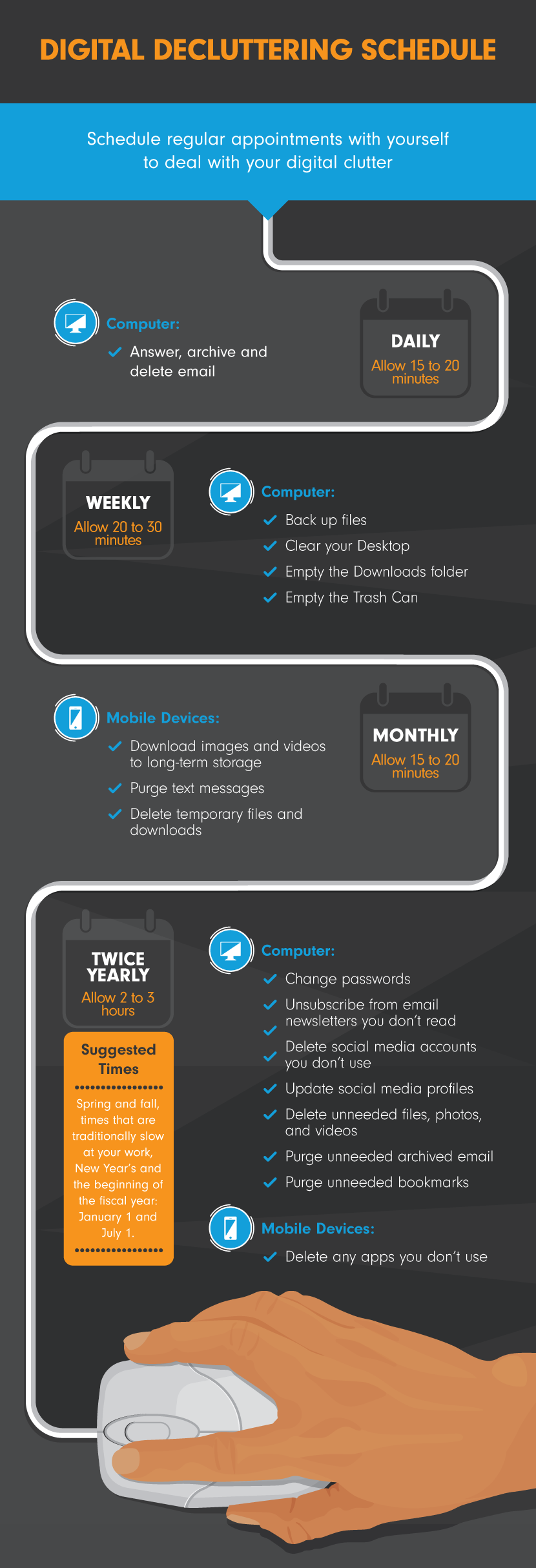
Make a Plan
Digital clutter builds up quickly. Get out your calendar, and schedule regular recurring dates with yourself to keep your data in order.
Destination Peace of Mind
Decluttering, organizing, and securing your digital data can be a big task, especially if you haven’t dealt with it for a while. However, your efforts will pay off. You’ll not only keep your computer and devices running well; you’ll likely enjoy greater productivity and peace of mind.