


TL;DR
To whitelist an email in Gmail, create a filter for the sender’s address or domain and check “Never send it to Spam.” In Outlook, add the address under Safe senders and domains in the Junk email settings. Yahoo uses a filter that sends the mail to Inbox, and AOL simply needs the sender saved as a contact.
“To be sure our emails always make it to your inbox, please add us as a contact or put us on your whitelist. If you have a Gmail account, follow these steps. Alternatively, if you use Outlook, find the steps here.”
Whitelisting is how you tell your email program that a sender is wanted. It is also one of the easiest ways to keep your inbox under control: the newsletters you chose land where you can see them, and the rest can be unsubscribed or filtered away.
How do you whitelist an email in Gmail?
In Gmail, whitelisting an email actually involves creating a filter.
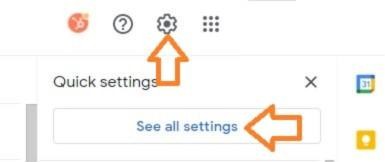
- Click the gear icon in Gmail and select “See all settings” from the Quick settings menu.
- Navigate to “Filters and Blocked Addresses” in the top menu.
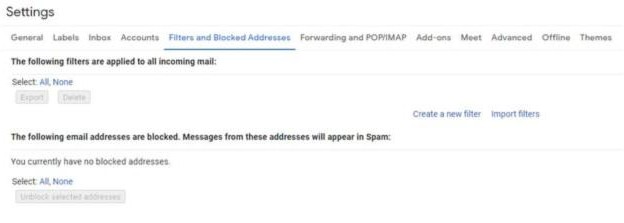
- Select “Create a new filter.”

- Add a specific email or a whole domain in the “From” field. The “From” field is where you’ll specify what’s getting whitelisted. In Gmail, you can specify either a specific email address (e.g. [email protected]), or you can whitelist a whole domain by omitting everything before the at symbol (e.g. @domain.com). The former will whitelist one specific email address while the latter whitelists anyone who is sending emails from that domain.
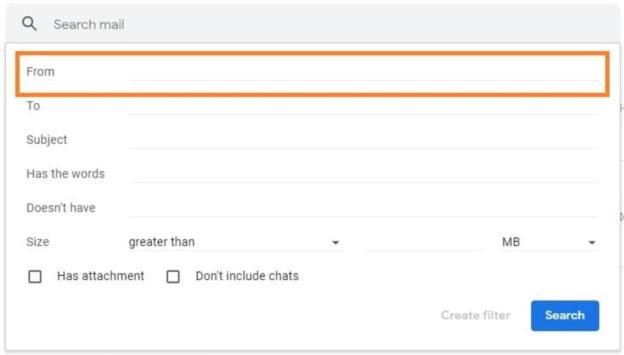
- Click “Create filter.” From there, you don’t need to input any additional information. Simply click the Create filter button at the bottom of the window (next to the blue Search button).
- Check “Never send it to Spam” in the checkbox. Clicking the button brings up a new window. Here’s where you’ll actually specify that what you’re doing is whitelisting. In Gmail, you do this by checking the Never send it to spam box. Doing so will ensure that emails that meet the criteria you specified never end up in Spam or Trash (unless you do so manually).
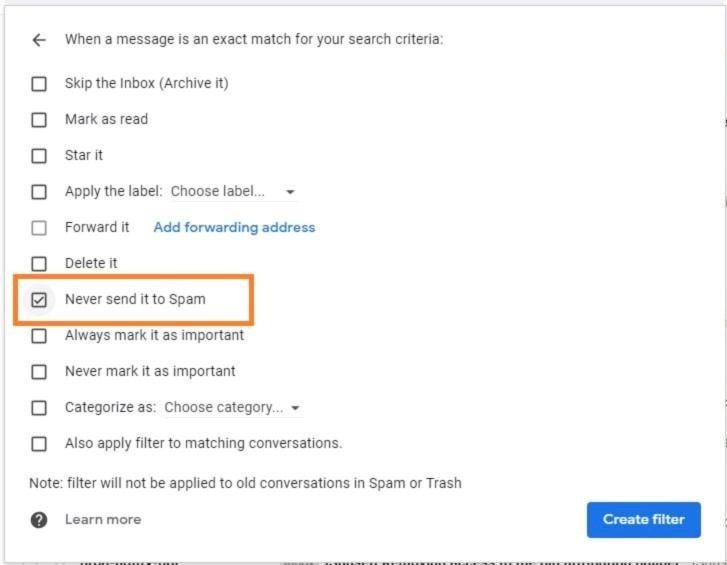
- Click “Create filter.” Once this information is specified, you click the “Create filter” button again, and this creates the whitelist within Gmail.
How do you whitelist an email in Outlook?
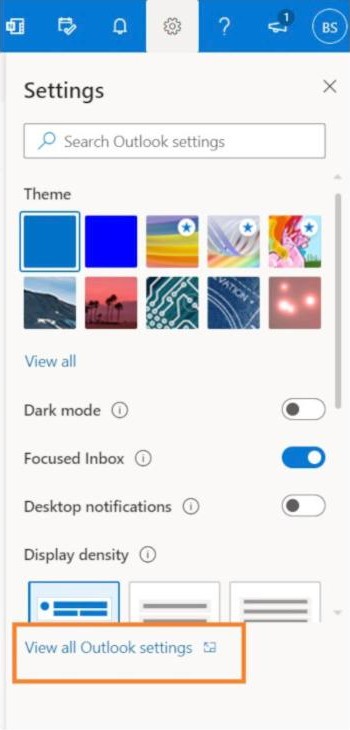
- Click the gear icon in Outlook and select “View all Outlook settings.” When you select it, a drop-down menu will appear. At the bottom of the drop-down menu, you’ll choose View all Outlook settings.

- Select “Mail” from the settings menu.
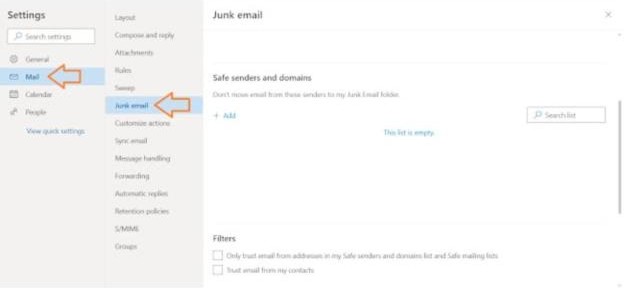
- Choose “Junk email” from the submenu.
- Click “Add” under “Safe senders and domains.”
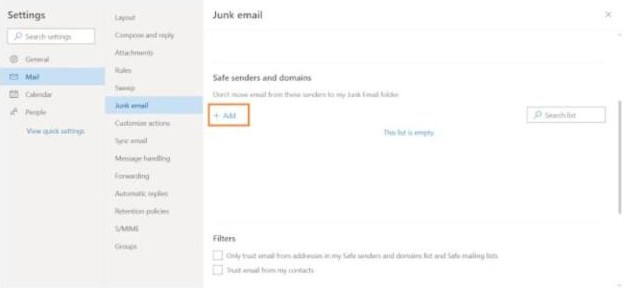
- Enter the email address that you want whitelisted.
- Choose “Save.” This will save your whitelist preferences and ensure that emails that fit the criteria don’t make it to your junk email folder in Outlook.
How do you whitelist an email in Yahoo?
- Open Yahoo Mail and log into your account.
- Navigate to “Settings” then click “More Settings.”
- Select “Filters” and hit “Add” to enter the email you’d like to whitelist.
- Name the filter and add the email address.
- Select to send all mail to “Inbox.”
- Save your settings.
How do you whitelist an email in AOL?
- Log in to your AOL account.
- Open “Contacts” from the left navigation pane.
- Click the “New Contact” icon and add the email address.
- Click the “Add Contact” button and you’re set.
Whitelisting handles the mail you want. For the mail you don’t, see 5 Tips to Help Organize Your Mail and Declutter And Organize Your Digital Clutter.
Keep reading
- Eliminating Mail ClutterSort mail over the trash can and give every category a home.
- 5 Tips to Help Organize Your MailKathi’s answer to a client whose mail had taken over the house.
- Declutter And Organize Your Digital ClutterFolders, file names, email filters and backups for your digital files.
Frequently asked questions
How do I whitelist an email address in Gmail?
+
In Gmail, whitelisting means creating a filter. Click the gear icon, choose See all settings, open Filters and Blocked Addresses, and select Create a new filter. Put the address or domain in the From field, click Create filter, check Never send it to Spam, then click Create filter again.
Can I whitelist a whole domain instead of one address?
+
Yes. In Gmail’s From field you can enter either a specific email address, such as [email protected], or a whole domain by leaving out everything before the at symbol, such as @domain.com. The first whitelists one sender; the second whitelists anyone sending from that domain.
How do I whitelist an email in Outlook?
+
Click the gear icon and choose View all Outlook settings. Select Mail, then Junk email. Under Safe senders and domains click Add, enter the email address you want whitelisted, and choose Save. Mail that matches will no longer be sent to your junk email folder.
How do I whitelist an email in Yahoo Mail?
+
Open Yahoo Mail and log in. Go to Settings, then More Settings. Select Filters and click Add to enter the email you want to whitelist. Give the filter a name, add the email address, choose to send all matching mail to Inbox, and save your settings.
How do I whitelist an email in AOL?
+
Log in to your AOL account and open Contacts from the left navigation pane. Click the New Contact icon, add the sender’s email address, and click the Add Contact button. Saving the sender as a contact is all AOL needs to keep that mail out of the spam folder.
Originally published on Organized and Energized on July 6, 2023. Moved to addSpace and updated 2026-11-07.